> ## Documentation Index
> Fetch the complete documentation index at: https://anvil.servicetitan.com/llms.txt
> Use this file to discover all available pages before exploring further.

# Introducing Drilldown

export const BlogMeta = ({date, author, tags}) => {
  const formatList = items => {
    if (!Array.isArray(items)) return items;
    if (items.length === 1) return items[0];
    if (items.length === 2) return `${items[0]} & ${items[1]}`;
    return `${items.slice(0, -1).join(", ")}, & ${items[items.length - 1]}`;
  };
  return <div className="flex flex-wrap items-center gap-2 text-sm text-gray-500 dark:text-gray-400">
      <span>{date}</span>
      <span>|</span>
      <span>{formatList(author)}</span>
      {tags && tags.length > 0 && <>
          <span>|</span>
          <div className="flex flex-wrap gap-1.5">
            {tags.map(tag => <span key={tag} className="px-2 py-1 rounded bg-gray-100 dark:bg-neutral-800 text-xs">
                {tag}
              </span>)}
          </div>
        </>}
    </div>;
};

<div style={{ position: "relative", paddingBottom: "56.25%", height: 0 }}>
  <iframe src="https://www.loom.com/embed/36d901fea4894a00bd46747e49d4afa3" frameborder="0" webkitallowfullscreen mozallowfullscreen allowfullscreen style={{ position: "absolute", top: 0, left: 0, width: "100%", height: "100%" }} />
</div>

<BlogMeta date="February 9, 2026" author="James Coyle" tags={["Design & Engineering", "New Features", "Web"]} />

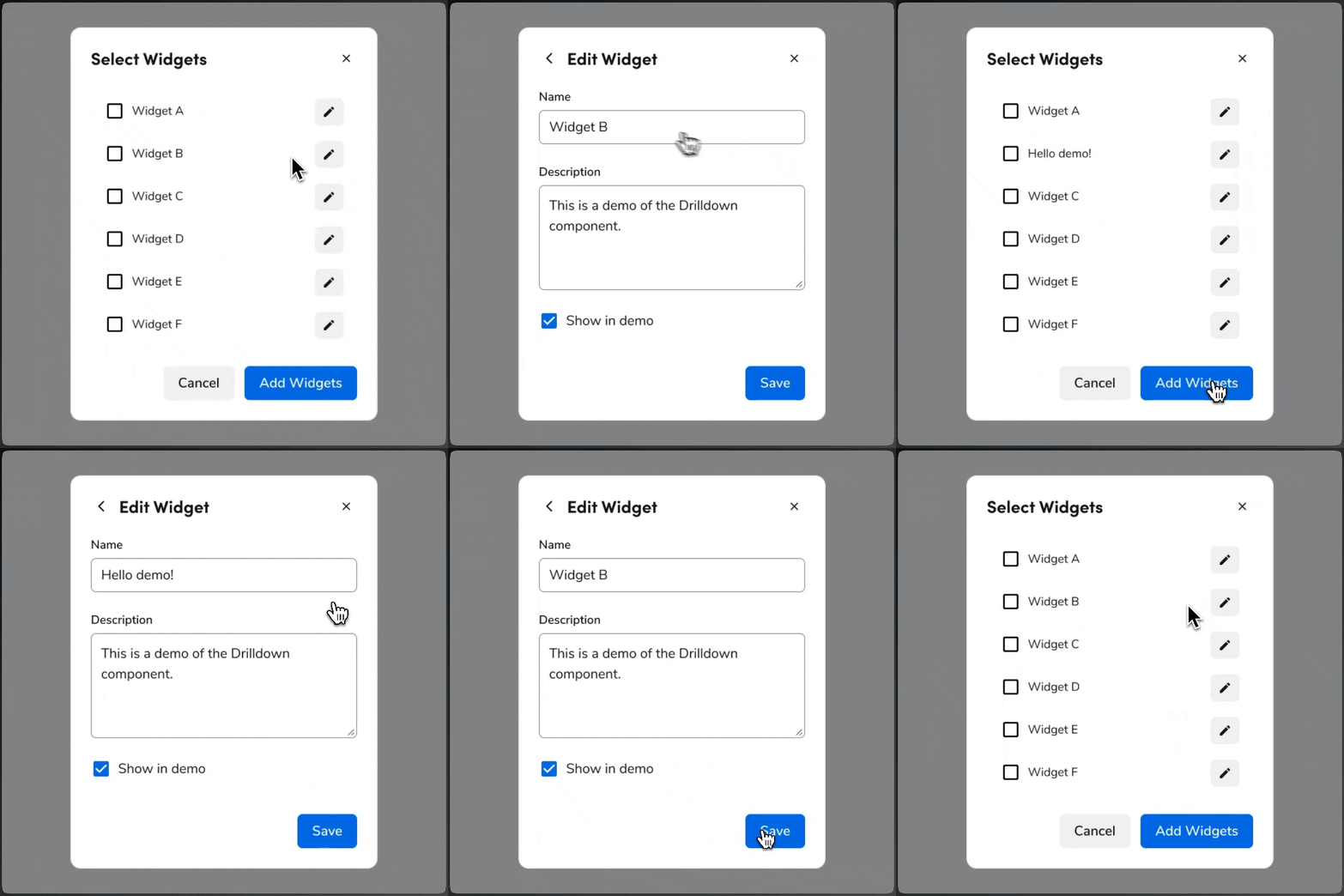
Anvil2 has released a new Drilldown pattern for progressive disclosure inside Dialogs, Drawers, and Page Panels.

Drilldowns let users move from a parent view into a child view within the same container. Designers can use it in constrained layouts or smaller UIs when preserving parent context adds value. Developers get a helper that works with `Dialog`, `Drawer`, and `Page.Panel`—each `DrillDown` has a header, content, optional footer, and a built-in back action.

<Frame>
  <div className="w-full h-[520px] bg-[#FFFFFF] p-2 rounded flex items-center justify-center overflow-hidden">
    <img src="https://mintcdn.com/servicetitan/ke9Ik-t8KWtN-6pP/images/blog/drilldown/drilldown-demo.gif?s=b58b9725eaf2ee82510dba9389bd6068" alt="Animation of how Drilldown works in Anvil2" className="max-h-full object-contain" width="720" height="720" data-path="images/blog/drilldown/drilldown-demo.gif" />
  </div>
</Frame>

## How Drilldown works in Anvil

Drilldown is a navigation pattern that keeps the user in the same container. Clicking a trigger (for example, a row or link) opens a drilldown view that overlays the parent content. The back action returns to the parent; closing the container (e.g., backdrop or close control) dismisses the whole UI.

### Where you can use Drilldown

Drilldown is supported in:

* **Dialog** — Use for flows that start from a dialog and need a deeper step without leaving the dialog.
* **Drawer** — Use for side panels where users drill into detail (e.g., editing a single item from a list).
* **Page Panel** — Use inside a page panel when you need a sub-view without navigating to a new page.

Drilldown is not used in Popover or Combobox; those surfaces are not intended for multi-step drilldown flows. For those cases, use a Dialog instead.

### What Drilldown offers

Each drilldown view consists of a back action, a header, optional close action, content area, and optional footer. You can use multiple `DrillDown` components as siblings, each with an `index`, and advance or go back with `DrillDown.NextButton` and `DrillDown.PrevButton`. Focus follows the container (Dialog, Drawer, or Page Panel) that hosts the drilldown.

For full anatomy, options, and when to use (or avoid) Drilldown, see the [Drilldown design](/docs/web/components/drilldown/design) and [code](/docs/web/components/drilldown/code) docs.