> ## Documentation Index
> Fetch the complete documentation index at: https://anvil.servicetitan.com/llms.txt
> Use this file to discover all available pages before exploring further.
# Pagination – Design
> The Pagination helps people move through large result sets one page at a time, stay oriented, and jump directly to the page they need
## Anatomy
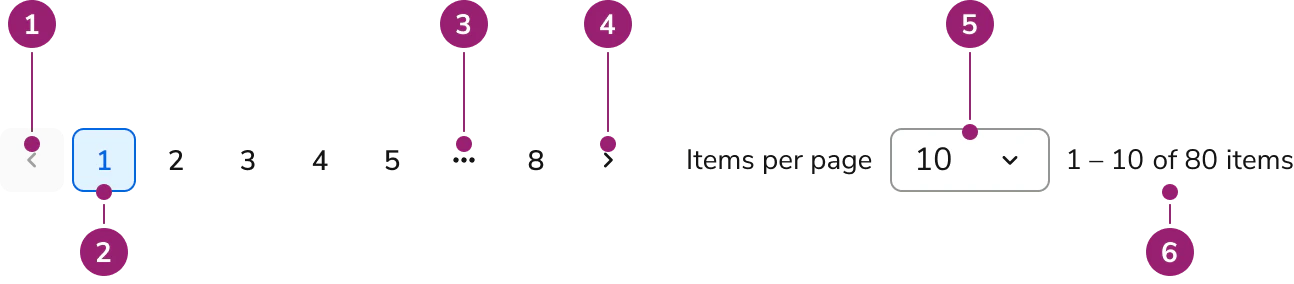 1. **Previous Button** — moves to the prior page; disabled on the first page.
2. **Page Button** — numeric buttons for direct jumps.
3. **Truncated Page Dropdown Button** — ellipsis “⋯” that opens a jump menu for hidden ranges.
4. **Next Button** — moves to the next page; disabled on the last page (when total is known).
5. **Items per page select** — sets page size (e.g., 10/25/50/100).
6. **Counter** — displays the current range and total (e.g., “1 – 10 of 100 items”).
***
## Options
### Total count availability
When the total item count is unknown, the component switches to Unknown total mode and does not show Page Buttons or the Counter. Navigation is via Previous/Next, and users can still adjust Items per page.
#### Known total
1. **Previous Button** — moves to the prior page; disabled on the first page.
2. **Page Button** — numeric buttons for direct jumps.
3. **Truncated Page Dropdown Button** — ellipsis “⋯” that opens a jump menu for hidden ranges.
4. **Next Button** — moves to the next page; disabled on the last page (when total is known).
5. **Items per page select** — sets page size (e.g., 10/25/50/100).
6. **Counter** — displays the current range and total (e.g., “1 – 10 of 100 items”).
***
## Options
### Total count availability
When the total item count is unknown, the component switches to Unknown total mode and does not show Page Buttons or the Counter. Navigation is via Previous/Next, and users can still adjust Items per page.
#### Known total
 #### Unknown total
 ### Truncation strategy
* **Max visible Page Buttons:** 7 total.
* **First/last pinned:** pages `1` and `last` are always visible.
* **Window:** show **current** with up to two neighbors on each side; replace hidden ranges with a **“⋯” dropdown**.
* **Small sets:** if total pages **≤ 7**, show all pages with no truncation.
* **Examples:**
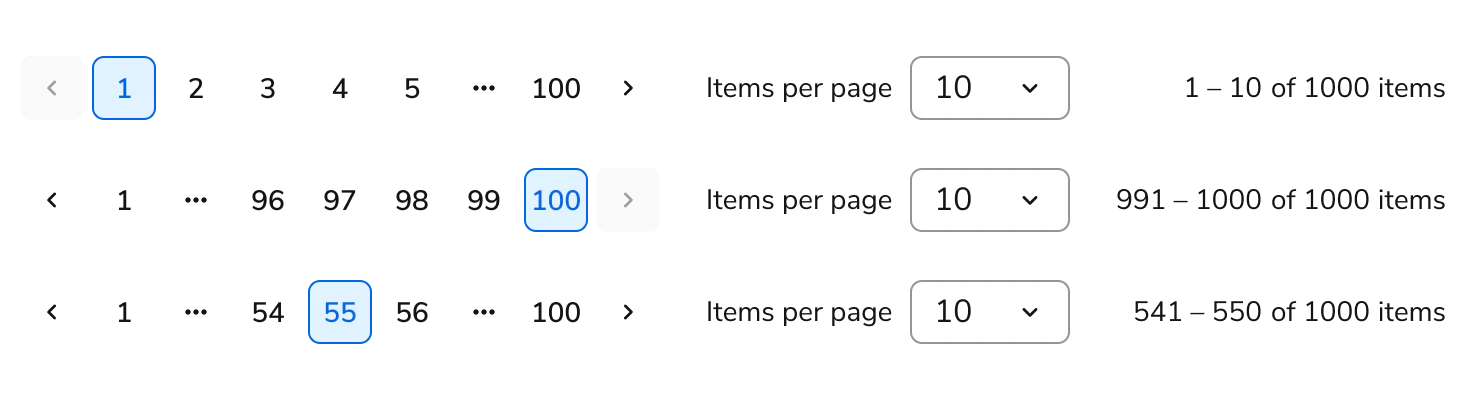
* Start (page 1): `1 2 3 4 5 ⋯ 100`
* End (page 100): `1 ⋯ 96 97 98 99 100`
* Middle (page 55): `1 ⋯ 54 55 56 ⋯ 100`
### Truncation strategy
* **Max visible Page Buttons:** 7 total.
* **First/last pinned:** pages `1` and `last` are always visible.
* **Window:** show **current** with up to two neighbors on each side; replace hidden ranges with a **“⋯” dropdown**.
* **Small sets:** if total pages **≤ 7**, show all pages with no truncation.
* **Examples:**
* Start (page 1): `1 2 3 4 5 ⋯ 100`
* End (page 100): `1 ⋯ 96 97 98 99 100`
* Middle (page 55): `1 ⋯ 54 55 56 ⋯ 100`
 ### Counter format
* **Known total:** “**Start – End of Total items**” (e.g., “1 – 10 of 100 items”).
* **Unknown total:** “**Start – End items**” (e.g., “1 – 10 items”).
***
## Usage Guidelines
Use the **Pagination** when dividing large result sets into predictable, numbered segments to support direct navigation and orientation.
* **Use when:** users need precise jumps, totals are meaningful, or stable placement matters.
* **Avoid when:** content is continuous (use infinite scroll), results are very small (show all), or steps represent task progress (use a [**Stepper**](/docs/web/components/stepper/design)).
* **Placement:** place below results.
* **Consistency:** keep page-size presets consistent across products.
***
## Content
Content within the **Pagination** should keep the counter clear and context-aware.
* **Counter noun (“items”) is contextual:** replace items with the domain noun (e.g., orders, records, messages) to reflect what’s being paged.
* Examples: “1 – 10 of 100 orders”, “1 – 25 of 325 records”, “1 – 1 of 1 message”.
* **Singular/plural:** use message (singular) when End and Total are **1**; otherwise use the plural form.
* **Unknown totals:** when the total is unknown, omit it but keep the noun: “1 – 10 messages”.
* **Formatting:** use an en dash with spaces (`1 – 10`) and sentence case for the noun.
### Counter format
* **Known total:** “**Start – End of Total items**” (e.g., “1 – 10 of 100 items”).
* **Unknown total:** “**Start – End items**” (e.g., “1 – 10 items”).
***
## Usage Guidelines
Use the **Pagination** when dividing large result sets into predictable, numbered segments to support direct navigation and orientation.
* **Use when:** users need precise jumps, totals are meaningful, or stable placement matters.
* **Avoid when:** content is continuous (use infinite scroll), results are very small (show all), or steps represent task progress (use a [**Stepper**](/docs/web/components/stepper/design)).
* **Placement:** place below results.
* **Consistency:** keep page-size presets consistent across products.
***
## Content
Content within the **Pagination** should keep the counter clear and context-aware.
* **Counter noun (“items”) is contextual:** replace items with the domain noun (e.g., orders, records, messages) to reflect what’s being paged.
* Examples: “1 – 10 of 100 orders”, “1 – 25 of 325 records”, “1 – 1 of 1 message”.
* **Singular/plural:** use message (singular) when End and Total are **1**; otherwise use the plural form.
* **Unknown totals:** when the total is unknown, omit it but keep the noun: “1 – 10 messages”.
* **Formatting:** use an en dash with spaces (`1 – 10`) and sentence case for the noun.