


Anatomy
The Details consists of three primary elements that work together to show or hide information when clicked.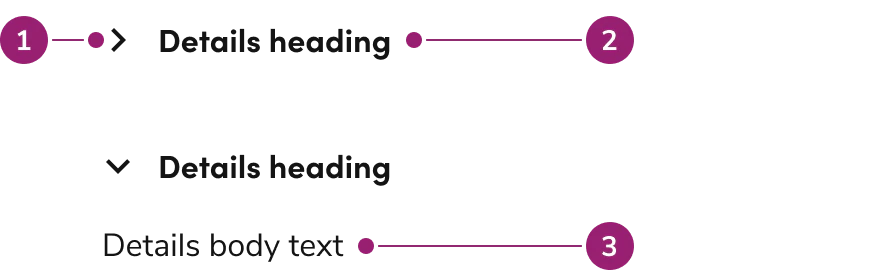
- Chevron
- Heading
- Body content
Options
The Details supports flexible content configurations to accommodate various accordion scenarios.Behavior
The Details responds to user interaction with flexible opening and closing behaviors while handling content overflow.Closed by default
Details are closed until clicked by default. Configure them to open by default when showing this content immediately.Opening behavior
By default, individual Details open and close independently of each other. Configure them to work like an accordion, where only 0 to 1 individual Details is open at once.Heading overflow
Long headings will wrap when there is not enough room for it to be on one line. The chevron indicator will be vertically centered with the height of the heading.Content overflow
Body content for Details will display in full unless a specific height is set. When a height is set, the body content will appear with a scrollbar.Usage Guidelines
Alternatives
Details vs Tab
Details are used to show additional information around a sub-topic on a page, while a Tab categorizes information. The context of Details is small, non-essential information, while Tabs can categorize both small and large, essential and non-essential information.How to Use
In a group with other Details
Use Details as supplementary information that is not critical to completing a task.Content
Content within the Details should provide supplementary information that enhances understanding without being critical to task completion.Keyboard Interaction
Users can navigate the Details using standard keyboard controls.Code
- Implementation
- Details Props
- Details.Content Props
- Details.Summary Props
Common Examples
JSX content in details
Thechildren prop of the Details component can accept any ReactNode. In many cases, text will be all that is required. In more complex scenarios, other Anvil2 components and JSX can be used.Controlling details
By default, theDetails component is uncontrolled and expands/collapses based on user input (on click or on enter or space key press when the element is focused). Use the expanded prop to control the details expanded state programatically.Accordions
To create an accordion-style details list, control the open state of each item using theexpanded on onClick props.Details content height options
The following props are available to control the height of the details content:height and maxHeight. If either is set, the content element will also have overflow: auto.