

Anatomy
The Divider consists of two primary elements that work together to separate content.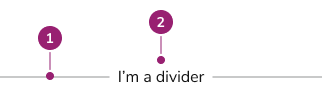
- Divider line
- Content
Options
The Divider supports spacing, orientation, and content alignment configurations to accommodate various separation scenarios.Spacing
Vertical
Divider supports vertical orientation for separating content horizontally.Content
Divider supports content to provide additional information to users.Content Alignment
Content aligns to start, end, or center.Behavior
The Divider responds to spacing and orientation requirements while maintaining consistent visual separation.Usage Guidelines
Don’t
How to Use
Spacing considerations
Divider supports multiple spacing configurations. Follow these general principles:- If used within a Form, spacing conforms to the Form pattern.
- Maintain internal consistency within the product area for spacing choices.
- When interactive elements exist near Dividers, use more spacing to meet WCAG guidance on touch target size minimums.
Content
Content within the Divider should provide additional context when needed, keeping it concise and informative.Keyboard Interaction
Users can navigate the Divider using standard keyboard controls.Code
- Implementation
- Divider Props
Common Examples
Adjust space around dividers
The following values can be provided to thespacing prop of the Divider, and increment by 0.5rem (except for "half", which increments by 0.25rem).Divider orientation
The divider can be used to separate both horizontal (main axis) and vertical (cross axis) content. By default, dividers are on the main axis. Set thevertical prop on the Divider component to true to use the cross axis.Main axis (default)
Cross axis (vertical)
Creating sections with Card
To create sections within aCard, use a padding of 0 along with the Divider, then give each child element its own padding as needed.