

Anatomy
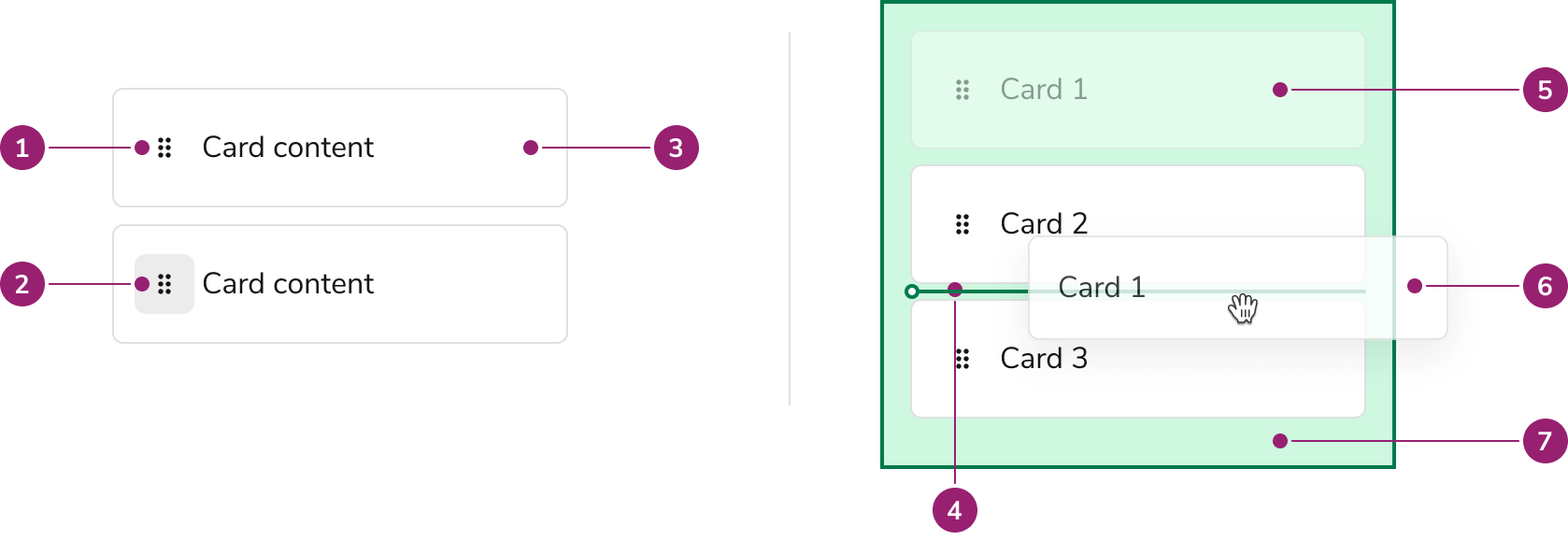
- Drag Handle
- Drag Handle Button
- Draggable Card
- Sort Line
- Drag Ghost
- Drag Preview
- Drop Zone
Options
Draggable Card
Besides the handle, the Draggle Card’s content is highly customizable. Draggable Card can use many of the features of the base Card component.Draggable Target
Where a user can grab a Card is configurable to the whole card or only on the drag handle.Whole Card
Use the whole Card as a draggable region when:- Users do NOT need to select the text of the Card
- D&D is a major feature of the content
- Outside of an overflow menu, other inner Card actions are not present
Drag handle only
Use the Drag Handle only as the draggable region when:- A user should be able to select the text of the Card
- The Card is very large
- There are other, non-overflow menu actions a user can take in the Card. This could be something as simple as a Checkbox.
Drag Preview
Drag Previews, what is displayed while dragging, can be customized.Drop Zone
Sort Line
Behavior
Drag handle alignment
The drag handle is always top-aligned in the Draggable Card. The rest of the card content can be vertically aligned as desired.Accessibility
Provide alternatives to Drag and Drop
While Dnd Sort is keyboard navigable, it is still preferable that users have alternatives to using drag and drop functionality to complete a task.Usage Guidelines
Examples of DND Sort
Sorting a List
Sorting a list is the primary usage of Dnd Sort. This can be done vertically and horizontally.Kanban-style sort
Also known as bucketing. Note that the Card containers & text are not explicitly part of the Dnd Sort component.Dashboard-type arrangements
How to Use
Use the base configurations of icons, drop zonesHow to Use
Use the base configurations of icons, drop zonesCode
- Implementation
- DndSort Props
- DndSort.Card Props
- DndSort.Zone Props
- DndSortChangeEvent
Common Examples
Bucketing
DndSort is a great way to create a drag-and-drop interface for moving items between different buckets.Sorting a list
DndSort is also a great way to create a drag-and-drop interface for sorting a list of items.Bucket and sort
DndSort can also be used to create a drag-and-drop interface for moving items between different buckets and sorting them within those buckets.Note this example also demonstrates cards initially beginning outside of the buckets.Validation
DndSort provides ways to validate the drag-and-drop interaction. This is useful for preventing invalid interactions, such as moving an item to a bucket that does not accept it.Basic Validation
The simplest way to validate is to use thetype prop on the DndSort.Card component in conjunction with acceptedTypes prop on the DndSort.Zone component.Advanced Validation
A more advanced way to validate is to use thevalidator prop on the DndSort.Zone component. This prop takes a function which receives the item id. The function should return a boolean indicating whether the drop is valid. Here are some examples of how to use the validator prop:Customization
DndSort provides a number of ways to customize the drag-and-drop interaction. This includes customizing the appearance of the items and zones.Advanced zone rendering
TheadvancedRenderer prop of DndSort.Zone is an alternative to children, allowing you to customize the appearance of the drop zone based upon its internal state.This allows you to show different content when a drag is happening, when an item is over the drop zone, or if the dragged item is valid/invalid for the drop zone.Custom card preview rendering
ThepreviewRenderer prop of DndSort.Card offers a means to customize the appearance of the card when it is being dragged. This is useful for showing a different appearance for the card, such as a simpler version of a complex card.Interactive Children
By default, theDndSort.Card places a button around the entire card. This is optimal for accessibility. But if you want to place interactive elements inside your card, it harms accessibility. To resolve this issue, set dragOnlyWithHandle on the DndSort.Card if your card has interactive elements.Anti-Patterns
Nesting
DndSort does not support nesting. i.e. you may not use a zone as an item.This is an intentional design decision to guarantee these components meet our accessibility and usability standards.If you have a use case that requires nesting, please reach out to us. We would love to hear about your use case and help you find a solution.Best Practices
dragOnlyWithHandle
Do
Don’t