

For development, import
DaysOfTheWeek from @servicetitan/anvil2. For design, find it in the Anvil2 file.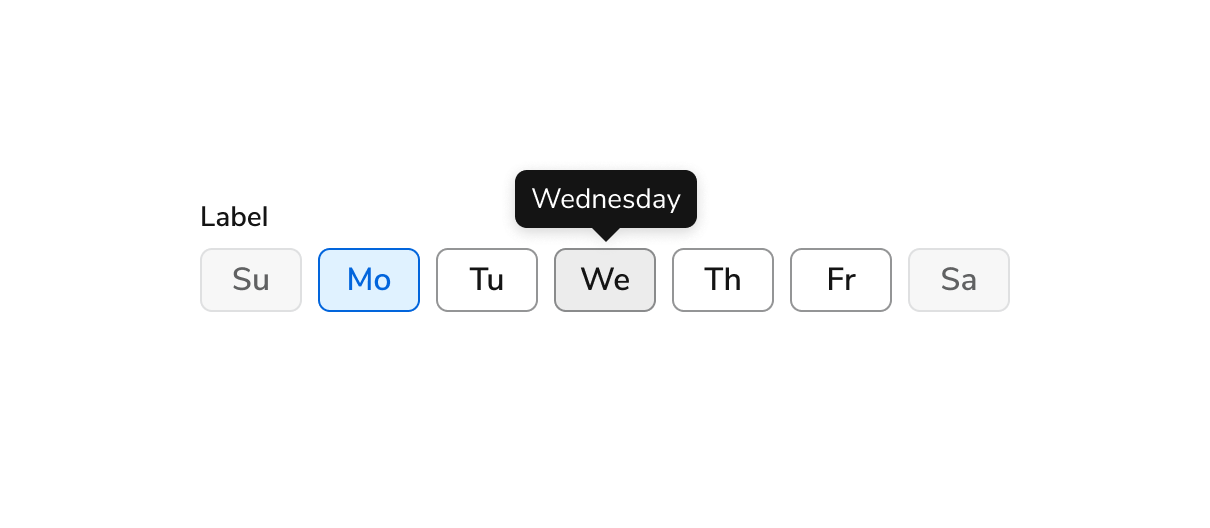
Anatomy
The Days of the Week consists of ten primary elements that work together to allow users to select days of the week.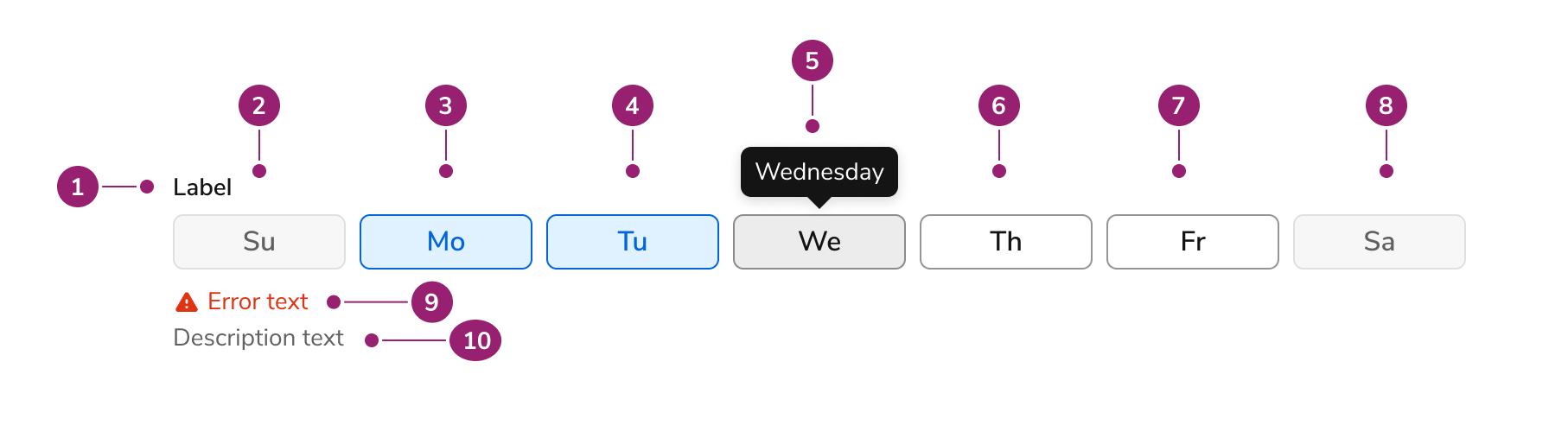
- Label
- First day of the week (in disabled state)
- Second day of the week (in checked state)
- Third day of the week (in checked state)
- Fourth day of the week (in hovered state, with tooltip with full name)
- Fifth day of the week (in unchecked state)
- Sixth day of the week (in unchecked state)
- Seventh day of the week (in disabled state)
- Hint/error text (in errored state)
- Description text
Options
The Days of the Week supports configurable start date configurations to accommodate various week representation scenarios.Default start date
By default, Days of the Week starts the week on Sunday.Configured start date
This behavior is configurable. The first day of the week here is set to Monday.Behavior
The Days of the Week responds to user interaction with distinct visual states and responsive width behaviors.Visual States
Day States
Each day of the week can be unchecked, checked, or disabled. On hover, the day of the week displays the full name of the day.Responsive Behavior
Days of the Week shrinks to 328px wide and grows to a maximum of 748px wide.Usage Guidelines
How to Use
Accessible Labels

Do

Don’t
Abbreviation
Do
Don’t
Content
Content within the Days of the Week should clearly communicate day selections through consistent abbreviations.How to abbreviate days of the week
- To keep interfaces clear and scannable, use two-letter abbreviations for days of the week (e.g., Mo, Tu, We). These are concise, easy to read at a glance, and align with how similar tools present this information.
- When possible, pair the abbreviation with a tooltip that shows the full day name on hover. This improves accessibility and helps avoid confusion, especially for less common abbreviations like “Tu” or “Th.”
Which day starts the week
- By default, weeks start on Sunday in the date recurrence picker. This setting is configurable from within the component.
Keyboard Interaction
Users can navigate the Days of the Week using standard keyboard controls.Accessibility
Anvil provides most of the accessibility needs for Days of the Week out of the box, and only needs some additional considerations for library users. For more guidance on form field labels and context, see input field context association best practices.Code
- Implementation
- DaysOfTheWeek Props
Common Examples
Labeling
DaysOfTheWeek can be given optional labeling props to help users understand the context around the component.Disabled
Fully disabled
TheDaysOfTheWeek can be marked disabled to disable all of the days.Partially disabled
TheDaysOfTheWeek can be marked disabled={number[]} to disable specific days of the week.Alternative Starting Day
Depending on your needs, theDaysOfTheWeek component can accept an alternative starting day via the firstDay prop. Here’s an example showing Monday as the first day of the week:Static day numbers
When using thefirstDay prop, it’s important to recognize that the numbers used to index days remain static. This prop only adjusts how the buttons are layout out visually.This means that props like selectedDays and disabled continue to treat Monday as 1, Tuesday as 2, and so on.Best Practices
Day Numbers
Take notice of the numbers used forselectedDays, onChange, firstDay, and disabled. If you are familiar with the Date object’s getDay method, you may find them surprising at first.We use numbers 1-7 to number days, beginning with Monday as 1 proceeding through Sunday as 7. This is an intentional decision based on a goal to remain consistent the Intl.Locale.prototype.getWeekInfo() and Temporal.PlainDate.prototype.dayOfWeek APIs.This is a implementation choice rooted in consideration of the ever evolving and improving web standards. We acknowledge that Date.prototype.getDay() uses 0-6 for Sunday-Saturday but we do not plan on matching this API. We prefer the more powerful and complete Intl and Temporal APIs.