

For development, import
FieldMessage from @servicetitan/anvil2. For design, find it in the Anvil2 file.Anatomy
The Field Message consists of primary elements that work together to show hint, error, warning, and description text to users.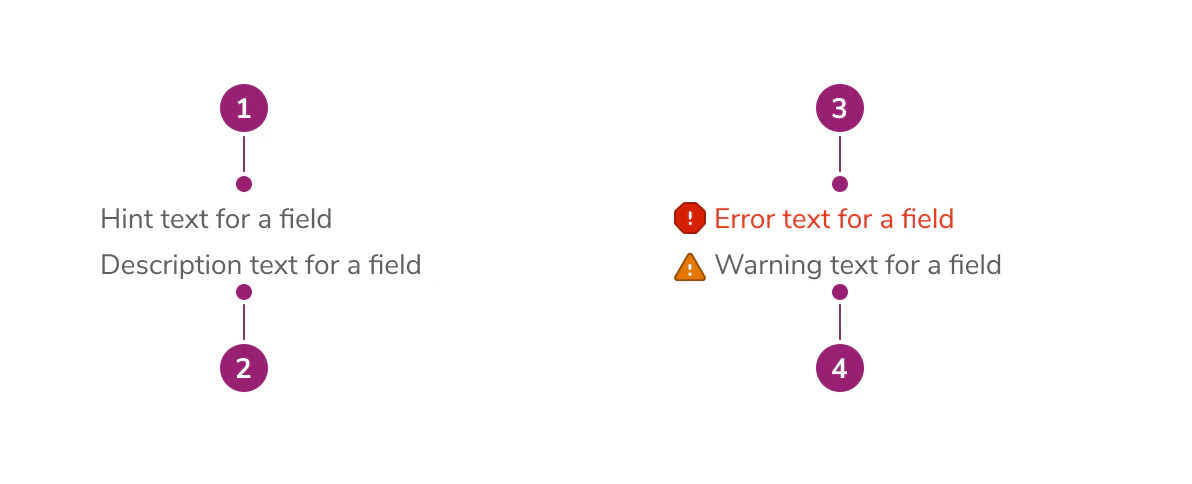
- Hint text (always visible, persists alongside errors and warnings)
- Description text (max 3 lines of content)
- Error message
- Warning message
Options
The Field Message supports hint, error, warning, and description text configurations to accommodate various form field messaging scenarios.Behavior
The Field Message displays all messages simultaneously in a consistent order: hint, description, error(s), then warning(s). No message type replaces another. Hint text always remains visible, even when error or warning messages are present. Description text appears between the hint and any error or warning messages. All messages are displayed in a consistent order: hint, description, error(s), then warning(s).Usage Guidelines
How to Use
Field Message is a subcomponent built into a number of our field components that handles communicating to users how to fill out a form, what the form field is for, and when relevant, why a field has errored. Field Message has four inputs:- Hint text
- Description text
- Error text
- Warning text
- Hint text: Communicates how a user should fill out a field. For example, “Enter time in increments of 30 minutes, e.g., 9:30 AM.” Always visible, even when errors or warnings are present.
- Description text: Communicates the way a field will be used. For example, “Sets the appointment time for the customer. Communicated out by SMS 24 hours before appointment time.”
- Error text: Communicates what the user has done wrong in filling out the field. For example, “Time entered not in an increment of 30 minutes.” Supports multiple error messages.
- Warning text: Communicates non-blocking issues that the user should be aware of. For example, “This email is associated with another account.”
How not to use
When using Anvil form field components such asCombobox, DateField, DaysOfTheWeek, TextField, or Textarea, you don’t need to use Field Message—Field Message is already built into the component.
Please look to our Form Patterns page for guidance on how to use hints, descriptions, and errors for your use case.
Content
Content within the Field Message should clearly communicate how to fill out the field, what the field is for, and when relevant, why a field has errored or what the user should be cautious about.Keyboard Interaction
Users can navigate the Field Message using standard keyboard controls.Code
- Implementation
- FieldMessage Props
Common Examples
Multiple Errors
Theerror prop accepts a string array to display multiple errors at once.Warning Messages
Thewarning prop accepts a string or string array.Errors and Warnings Together
Persistent Hints
Hints are now always visible, even when errors or warnings are present. Previously, the hint was hidden when anerrorMessage was displayed. This change makes hints more useful as persistent contextual guidance.Accessibility
Error messages always usearia-live="assertive" and warning messages always use aria-live="polite". These values are hardcoded to ensure a consistent and accessible experience.For accessibility, the FieldMessage component accepts an id prop that can be used to establish a relationship between the contents of the FieldMessage and the form component you are associating it with. To do this, you will likely need to use an ARIA attribute such as aria-describedby. See MDN docs.Related
- Errors and Warnings pattern — Guidance on surfacing errors and warnings across the app.
- Forms pattern — Best practices for form layout, labels, and help text.