


Anatomy
The Listbox consists of four primary elements that work together to allow users to select one or more items from a list of options.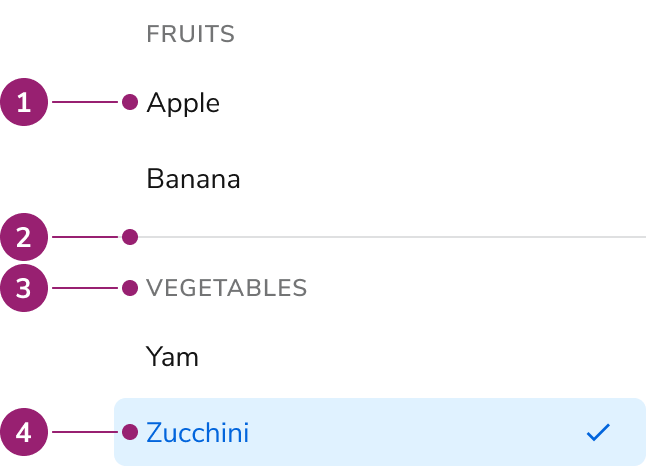
- Option
- Group divider
- Group header
- Selected option
Options
The Listbox supports grouping and multiple selection configurations to accommodate various selection scenarios.Grouping
Multiple selection
Behavior
The Listbox responds to user interaction with typeahead focus functionality and overflow handling.Typeahead focus
When the Listbox is in focus, a user can type a character to move focus to the next item that starts with that character. If typed quickly (750ms), focus will move to the next item that matches the string of characters typed.Overflow handling
Visual States
Usage Guidelines
Alternatives
Listbox vs List View
Use Listbox when using simple selections that do not require any customization. Use List View when requiring customized styling or secondary actions. List View may also be used when emphasizing to users that multi-selection is possible.Listbox vs Radio
For simple selection lists in a form, use a Radio. For selection lists that need to be an overlay, use a Listbox with a Combobox.Content
Content within the Listbox should clearly communicate each option through descriptive labels.Keyboard Interaction
Users can navigate the Listbox using standard keyboard controls.Accessibility
Listbox provides all of the necessary accessibility functionality.Don’t add additional interactive elements to the Listbox
The Listbox is designed for simple interactions, and cannot handle additional interactions, such as secondary actions. If designing for this, consider adopting similar accessibility guidance found in W3C ARIA’s Data Grid pattern. For more guidance on building accessible interactive lists, see custom components best practices.Code
- Implementation
- Single-select Listbox Props
- Multi-select Listbox Props
- Listbox.Option Props