

Anatomy
The Field Message consists of primary elements that work together to show hint, error, warning, and description text to users.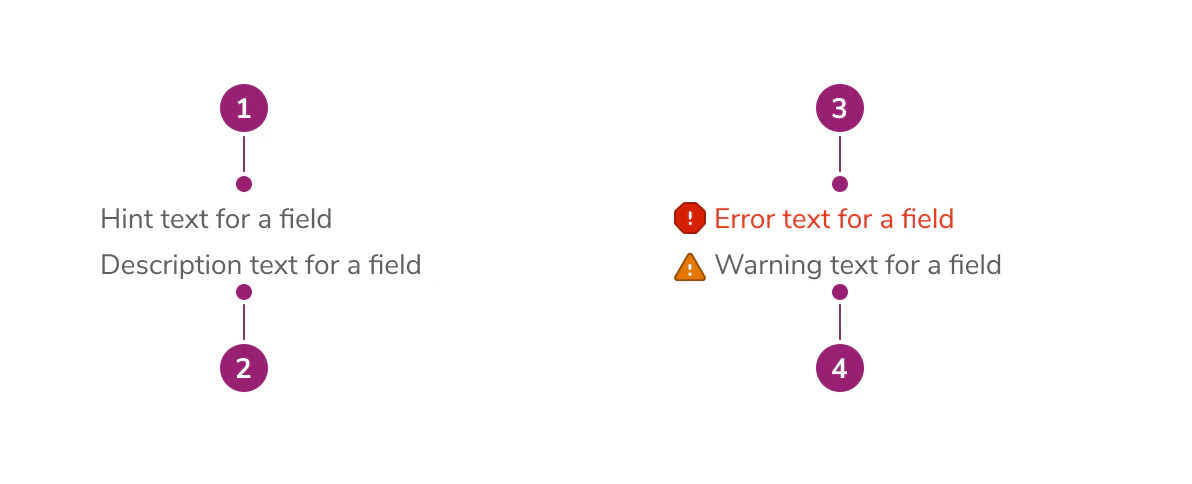
- Hint text (always visible, persists alongside errors and warnings)
- Description text (max 3 lines of content)
- Error message
- Warning message
Options
The Field Message supports hint, error, warning, and description text configurations to accommodate various form field messaging scenarios.Behavior
The Field Message displays all messages simultaneously in a consistent order: hint, description, error(s), then warning(s). No message type replaces another. Hint text always remains visible, even when error or warning messages are present. Description text appears between the hint and any error or warning messages. All messages are displayed in a consistent order: hint, description, error(s), then warning(s).Usage Guidelines
How to Use
Field Message is a subcomponent built into a number of our field components that handles communicating to users how to fill out a form, what the form field is for, and when relevant, why a field has errored. Field Message has four inputs:- Hint text
- Description text
- Error text
- Warning text
- Hint text: Communicates how a user should fill out a field. For example, “Enter time in increments of 30 minutes, e.g., 9:30 AM.” Always visible, even when errors or warnings are present.
- Description text: Communicates the way a field will be used. For example, “Sets the appointment time for the customer. Communicated out by SMS 24 hours before appointment time.”
- Error text: Communicates what the user has done wrong in filling out the field. For example, “Time entered not in an increment of 30 minutes.” Supports multiple error messages.
- Warning text: Communicates non-blocking issues that the user should be aware of. For example, “This email is associated with another account.”
How not to use
When using Anvil form field components such asCombobox, DateField, DaysOfTheWeek, TextField, or Textarea, you don’t need to use Field Message—Field Message is already built into the component.
Please look to our Form Patterns page for guidance on how to use hints, descriptions, and errors for your use case.