Anatomy

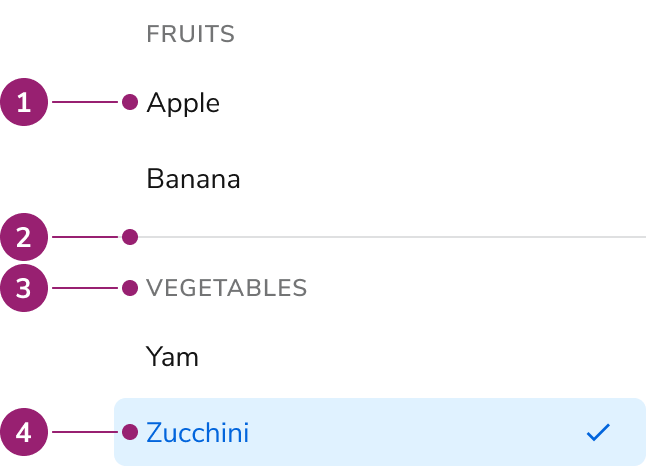
The Listbox consists of four primary elements that work together to allow users to select one or more items from a list of options.
Listbox
anatomy
  1. Option
  2. Group divider
  3. Group header
  4. Selected option

Options

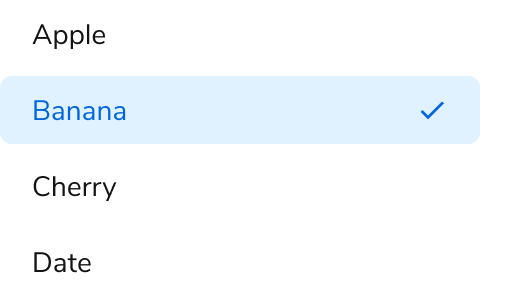
The Listbox supports grouping and multiple selection configurations to accommodate various selection scenarios.

Grouping

Multiple selection

Behavior

The Listbox responds to user interaction with typeahead focus functionality and overflow handling.

Typeahead focus

When the Listbox is in focus, a user can type a character to move focus to the next item that starts with that character. If typed quickly (750ms), focus will move to the next item that matches the string of characters typed.

Overflow handling

Visual States

Usage Guidelines

Use the Listbox when providing a set of selectable items in an overlay.

When to Use

Listboxes are used as a set of selectable items in an overlay. It is most commonly used for the options in a Combobox or when building a custom menu.

Alternatives

Listbox vs List View

Use Listbox when using simple selections that do not require any customization. Use List View when requiring customized styling or secondary actions. List View may also be used when emphasizing to users that multi-selection is possible.

Listbox vs Radio

For simple selection lists in a form, use a Radio. For selection lists that need to be an overlay, use a Listbox with a Combobox.

Content

Content within the Listbox should clearly communicate each option through descriptive labels.

Keyboard Interaction

Users can navigate the Listbox using standard keyboard controls.
KeyDescription
TabMoves to the next tab-able element outside of the Listbox.
Arrow keysNavigates through the available list items
SpaceActivates or deactivates the focused Listbox item.
HomeMoves focus to the first item in the Listbox.
EndMoves focus to the last item in the Listbox.
Printable characterMoves focus to the next item that has the character typed. If multiple characters are typed quickly (<750ms), focus moves to the next item with that combination of characters. If the next character takes longer than 750ms, focus is moved to the next item that starts with the new character typed.

Accessibility

Listbox provides all of the necessary accessibility functionality.

Don’t add additional interactive elements to the Listbox

The Listbox is designed for simple interactions, and cannot handle additional interactions, such as secondary actions. If designing for this, consider adopting similar accessibility guidance found in W3C ARIA’s Data Grid pattern. For more guidance on building accessible interactive lists, see custom components best practices.
Last modified on January 23, 2026