

Anatomy
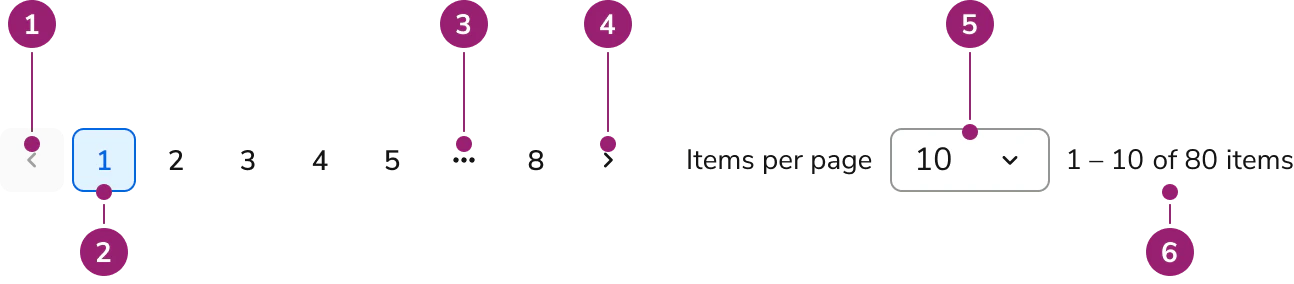
- Previous Button — moves to the prior page; disabled on the first page.
- Page Button — numeric buttons for direct jumps.
- Truncated Page Dropdown Button — ellipsis “⋯” that opens a jump menu for hidden ranges.
- Next Button — moves to the next page; disabled on the last page (when total is known).
- Items per page select — sets page size (e.g., 10/25/50/100).
- Counter — displays the current range and total (e.g., “1 – 10 of 100 items”).
Options
Total count availability
When the total item count is unknown, the component switches to Unknown total mode and does not show Page Buttons or the Counter. Navigation is via Previous/Next, and users can still adjust Items per page.Known total

Unknown total

Truncation strategy
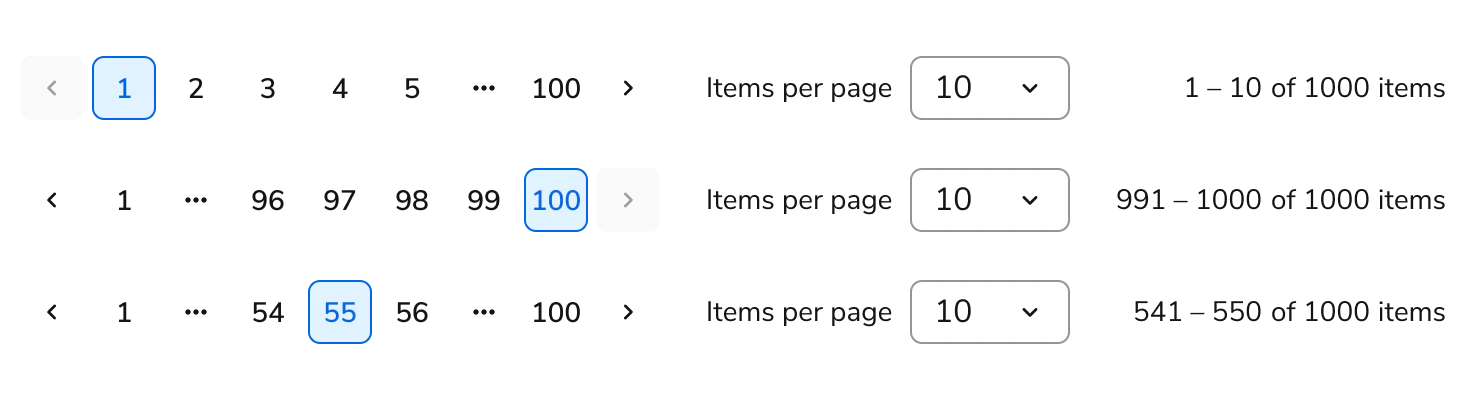
- Max visible Page Buttons: 7 total.
-
First/last pinned: pages
1andlastare always visible. - Window: show current with up to two neighbors on each side; replace hidden ranges with a “⋯” dropdown.
- Small sets: if total pages ≤ 7, show all pages with no truncation.
-
Examples:
- Start (page 1):
1 2 3 4 5 ⋯ 100 - End (page 100):
1 ⋯ 96 97 98 99 100 - Middle (page 55):
1 ⋯ 54 55 56 ⋯ 100
- Start (page 1):
Counter format
- Known total: “Start – End of Total items” (e.g., “1 – 10 of 100 items”).
- Unknown total: “Start – End items” (e.g., “1 – 10 items”).
Usage Guidelines
Use the Pagination when dividing large result sets into predictable, numbered segments to support direct navigation and orientation.When to Use
Use the Pagination when:- Large result sets – Results are too many to show at once and divide into predictable, numbered pages.
- Precise jumps – Users need to jump directly to a specific page.
- Meaningful totals – The total count helps users understand how many results exist and where they are within them.
- Stable placement – Results need to keep a predictable position across pages.
- Unknown totals – The total item count is unavailable. The Pagination switches to Unknown total mode and navigates with the Previous and Next Buttons.
When not to use
Avoid using the Pagination for:- Continuous content – Content reads as one continuous stream; use infinite scroll instead.
- Small result sets – Results are very small; show all results instead.
- Task progress – Steps represent progress through a task; use a Stepper instead.
- Data Table rows – The Data Table pages its own rows; use the Data Table’s built-in pagination instead of a separate Pagination.
Content
Content within the Pagination should keep the counter clear and context-aware.- Counter noun (“items”) is contextual: replace items with the domain noun (e.g., orders, records, messages) to reflect what’s being paged.
- Examples: “1 – 10 of 100 orders”, “1 – 25 of 325 records”, “1 – 1 of 1 message”.
- Singular/plural: use message (singular) when End and Total are 1; otherwise use the plural form.
- Unknown totals: the counter stays hidden. Do not show a range noun when the total is unknown.
- Formatting: use an en dash with spaces (
1 – 10) and sentence case for the noun.