


Anatomy
The Breadcrumbs consists of three primary elements that work together to represent navigation hierarchy.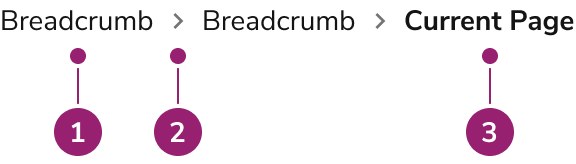
- Breadcrumb item link
- Separator
- Current page
Options
The Breadcrumbs supports one configuration that shows each Breadcrumb Item as a link, with the last item representing the current page.Default
Breadcrumbs have one configuration. Each Breadcrumb Item displays as a link, and the last Breadcrumb Item represents the current page.Behavior
The Breadcrumbs responds to navigation interactions and overflow scenarios while maintaining clear hierarchy representation.Visual States
Note that the last Breadcrumb item, the current page, is not interactive, and has no additional visual states.Interactions
All Breadcrumb items except the last item are links. Do not place items that cannot be represented as navigational elements in the Breadcrumbs.Breadcrumb Group Overflow
Breadcrumb Item Overflow
Usage Guidelines
How to Use
Only use Breadcrumbs to represent the site hierarchy
Use Breadcrumbs only to represent the hierarchy of the site or product area. This is sometimes known as location-based Breadcrumbs. Do not use Breadcrumbs to denote path-based behavior, where Breadcrumb content is dynamically generated based on the path users took to get to a page.Do Example using this doc site to show the site hierarchy.
Don’t Example of a hypothetical user session arriving to the same page. Breadcrumbs should not be used this way.
Always show the current page in the Breadcrumbs
When using Breadcrumbs, always represent the current page in the Breadcrumbs, even if the page title shows the same content.Do
Don’t