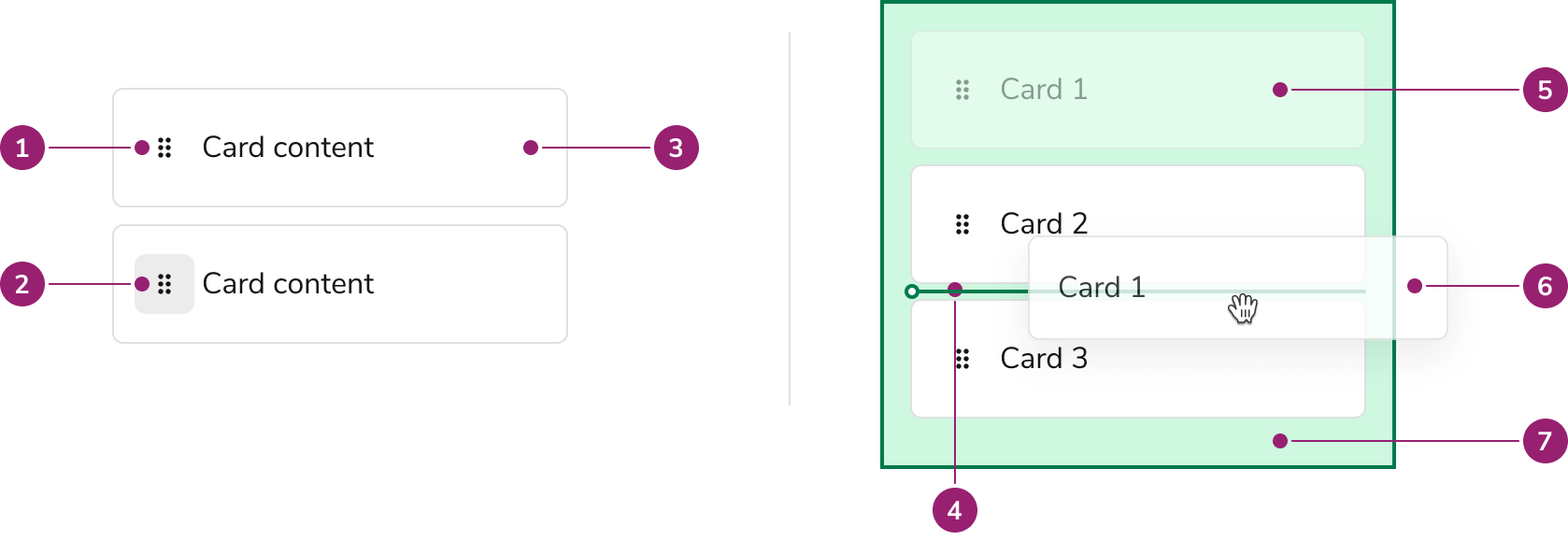
Anatomy

Anatomy of Drag and Drop sort
  1. Drag Handle
  2. Drag Handle Button
  3. Draggable Card
  4. Sort Line
  5. Drag Ghost
  6. Drag Preview
  7. Drop Zone

Options

Draggable Card

Besides the handle, the Draggle Card’s content is highly customizable. Draggable Card can use many of the features of the base Card component.

Draggable Target

Where a user can grab a Card is configurable to the whole card or only on the drag handle.

Whole Card

Use the whole Card as a draggable region when:
  • Users do NOT need to select the text of the Card
  • D&D is a major feature of the content
  • Outside of an overflow menu, other inner Card actions are not present

Drag handle only

Use the Drag Handle only as the draggable region when:
  • A user should be able to select the text of the Card
  • The Card is very large
  • There are other, non-overflow menu actions a user can take in the Card. This could be something as simple as a Checkbox.

Drag Preview

Drag Previews, what is displayed while dragging, can be customized.

Drop Zone

Sort Line

Behavior

Drag handle alignment

The drag handle is always top-aligned in the Draggable Card. The rest of the card content can be vertically aligned as desired.

Accessibility

Provide alternatives to Drag and Drop

While Dnd Sort is keyboard navigable, it is still preferable that users have alternatives to using drag and drop functionality to complete a task.

When to use

Dnd Sort is a collection used for a few sub-categories of possible Drag and Drop scenarios. Such situations include:
  • Sorting a vertical or horizontal list of items
  • Bucketing and sorting items, such as a kanban UI.

When not to use

Dnd Sort only covers a handful of drag and drop scenarios, alternative scenarios should not be forced to use this approach. In such cases, use the individual components found in Dnd to assemble your custom scenario.

Examples of DND Sort

Sorting a List

Sorting a list is the primary usage of Dnd Sort. This can be done vertically and horizontally.

Kanban-style sort

Also known as bucketing. Note that the Card containers & text are not explicitly part of the Dnd Sort component.

Dashboard-type arrangements

How to Use

Use the base configurations of icons, drop zones
Douse the provided icon for drag and drop
Don'tuse alternative icons for drag and drop

Do use the provided default styles of Drop Zone, sort line
Douse the provided default styles of Drop Zone, sort line
Don't simplify the styling of drag and drop
Don'tsimplify the styling of drag and drop. The default styling provides clarity on where a user can drop in a complicated app.
Last modified on January 23, 2026