

For development, import
SearchField from @servicetitan/anvil2. For design, find it in the Anvil2 file.
Anatomy
Four elements work together in the Search Field: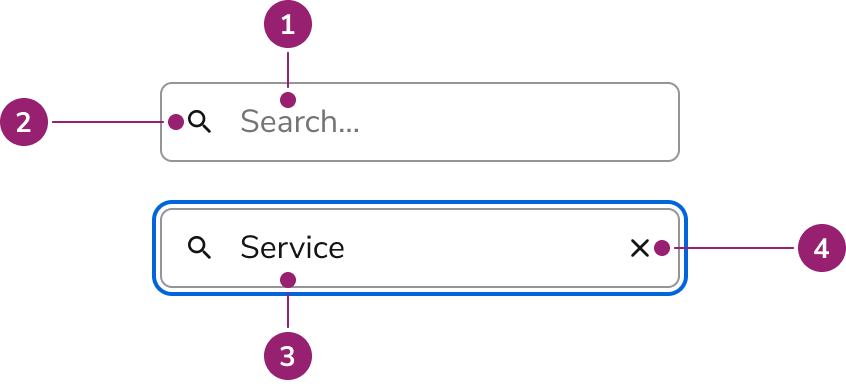
- Placeholder text
- Search icon
- Search value
- Clear button
Options
Configure Search Field for different scenarios:Sizes
Behavior
Search Field has distinct visual states and handles clearing and overflow.Visual States
Clearing
The clear button follows web standards:- Shows when there is an input value
- Not focusable, only clickable
Overflow
Long text scrolls horizontally within the container. The visible portion follows the cursor.Usage Guidelines
Alternatives
Search Field vs Combobox
Use Combobox when users select from an overlayed list of options, typically in a form field. Use Search Field for traditional search experiences, filtering lists on the page, tables, large datasets, or results that need additional filtering.How to Use
Combine Search Field with other UI elements for a complete search experience. Customize it to fit your needs.General search results guidance
- Keep the search term present after running search
- Show the number of results when possible
- Show filters when possible
- Leverage Skeleton loaders when waiting for results to populate
- Include a “no results” empty state when possible
Show the number of results when possible
Dropdown with results
- Consider creating sections to organize results.
- Consider adding filters to narrow down results.
- If there are additional results that are not shown, consider adding a link to a page with all available results.
- If the results become too complicated, consider using a Dialog over a Popover.
Content
Placeholder text and search results should clearly communicate the search context.Keyboard Interaction
Navigate the Search Field using standard keyboard controls.Accessibility
Search Field doesn’t have a label, so place it near related content to make its purpose clear. For more guidance on form field labels and context, see input field context association best practices.Code
- Implementation
- SearchField Props
Common Examples
Controlling search inputs
The value of search inputs are uncontrolled by default. To control a search input, use thevalue prop.Uncontrolled
Controlled
Form Example
TheSearchField component uses an HTML input and so can be used within an HTML form the same way that a regular HTML input element can.React Accessibility
Addaria-label or aria-labelledby so that screen readers can properly announce what this is searching.For more guidance on form field labels and context, see input field context association best practices.