

Using Anvil Icons
Detailed design spec, usage guidelines, and implementation guidelines for the Icon component can be found here.Material & Anvil
Anvil uses Material icons throughout the product so we’ve kept our grid relatively simple and familiar.Sizing
Icon sizing in Anvil follows the typical use case as Material. In general, it’s best practice to design in 16x and 24x sizes.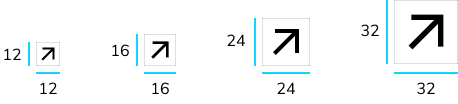
Actions with Icons
When giving a user the ability to perform an action through an Icon, such as opening a menu or editing an item, you can use the Button with an icon. This ensures consistent styling and functionality of icon-only actions across the application.Tooltips
In general, icons that stand on their own should have a tooltip. This provides important context to what the icon represents when a user hovers.Color
Icon colors can reflect their use case. In general, icons are black (Neutral-400), with other color uses to denote a status or a link. Icons should generally meet the WCAG AA color contrast guidelines, but can be lighter on larger icons with some form of label. For additional guidance on using color with icons, see our spec guidelines.Best Practices
- Icons without a text label should have a tooltip component.
- Icon colors should meet at least WCAG AA color contrast.
- Example: On a pure white background, icons should not be brighter than Neutral 90.
Requesting a new icon
Do not add icons directly to the@servicetitan/anvil2 package. Submit an icon request so visual design can produce the icon and the Anvil team can implement and expose it in code and Figma.
Before requesting a new icon, review the Standardized Icons list below and browse Material icons in Storybook to confirm an existing icon does not already meet your needs.
To request a new icon, post in #ask-vidz on Slack. See Add an Icon to Anvil on Confluence for the full request workflow.
Adding custom ServiceTitan icons to the codebase is handled by the Anvil team after design approval. See Adding New Custom ST Icons for the internal implementation process.