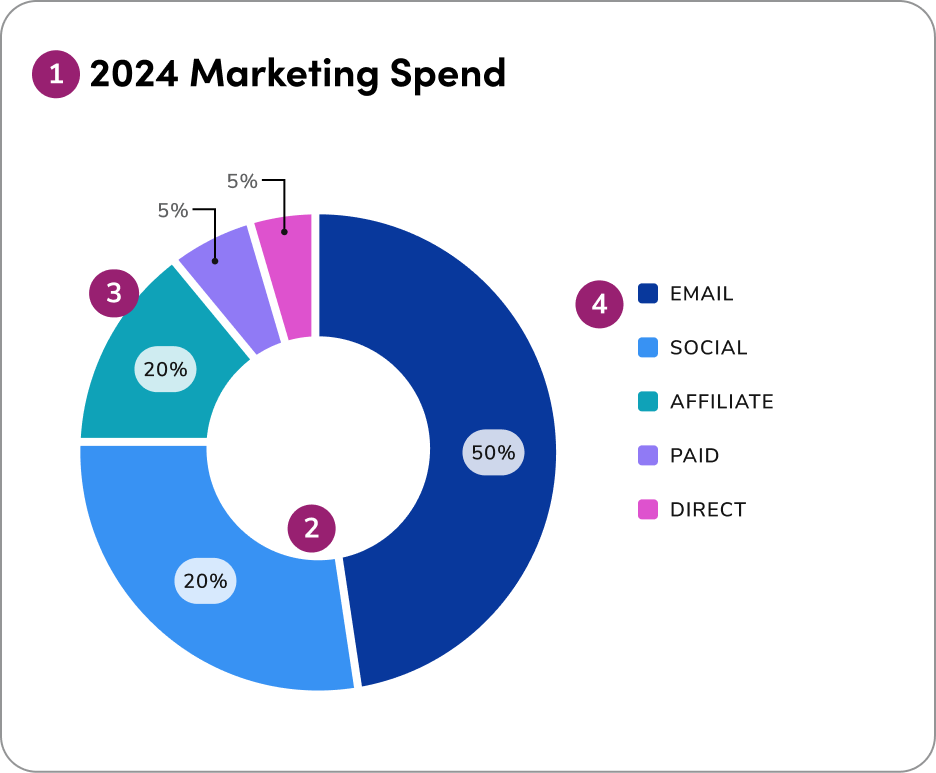
There is no practical difference between placing legends labels on the left or right. Placement should be chosen based on what fits best with the surrounding UI and layout. Example of a donut chart using 4px spacing and direct labeling:
A donut chart with direct labeling (#1)
  1. Headline
  2. Spacing: The space (1.4px) between donut sections
  3. Direct labeling
  4. Legend label

1. Show parts of a whole

Donut charts illustrate proportions of a total and work best for showing how each slice contributes to the whole, not for making detailed comparisons between categories.
donut chart using 4 variables for each slice, each representing a quarter
Douse donut charts to show how each category contributes to a whole. They are most effective for illustrating proportions and giving users a high-level view of the overall data distribution.
donut chart using 4 variables for each slice, each representing a month
Don'tuse donut charts when the goal is to make precise comparisons between categories. Their circular layout makes it difficult to judge small differences in size accurately.

2. Total must equal 100%

Ensure all slices together represent the full dataset and form a meaningful whole. Donut charts should only be used when all parts add up to 100% and clearly show how each category contributes to the total.
donut chart using 4 variables for each slice, each representing a quarter
Douse donut charts only when all slices represent a complete dataset, ensuring each segment clearly shows its proportional contribution for accuracy and quick interpretation.
donut chart using 4 variables for each slice, each representing a month
Don'tuse a donut chart when the data doesn’t represent parts of a whole or fails to add up to 100%. This can mislead users and reduce the clarity of the visualization.

3. Group small slices

Combine minor categories into an “Other” slice, and sort the remaining slices logically — either clockwise from largest to smallest, or in a meaningful order like time or category flow. Always place “Other” at the end to keep the chart organized and easy to interpret.
donut chart using 8 variables with an 'Other' slice
Docombine minor categories into a single 'Other' slice to maintain clarity. Sort the remaining slices logically - either clockwise from largest to smallest or by a meaningful sequence like time or category flow. Always position the 'Other' slice at the end to keep the chart clean and easy to read.
donut chart with too many small slices
Don'tdisplay too many small slices or scatter them randomly throughout the chart. This creates visual clutter and makes it difficult for users to interpret the data.

4. Use color wisely

Use color wisely in donut charts-apply the extended palette to differentiate categories when more than 5 are required, always ensuring clarity and accessibility.
donut chart using 5 variables with contrasting colors
Doapply color intentionally use the categorical palette to differentiate distinct categories with 5+ variables. Always ensure color choices support clarity, maintain accessibility, and reinforce the chart’s purpose.
donut chart using 5 variables with similar colors
Don'tuse color arbitrarily or apply too many similar shades in a donut chart, as this can confuse users and make it hard to distinguish between categories or interpret meaning.

5. Donut vs. Pie

Donut charts are often preferred over pie charts in dashboards, as they provide a cleaner, more streamlined layout, allow for central labeling of key metrics, and help users interpret data proportions more easily at a glance.
donut chart using 3 variables
Douse donut charts in dashboards to provide a cleaner, more efficient layout. The open center allows for labeling important metrics, and the circular format helps users quickly understand data proportions at a glance.
pie chart using 3 variables
Don'tdefault to pie charts in dashboard designs, as their layout can appear cluttered and limit space for key metrics or contextual labeling.

Questions? Challenges?

Contact the Visual Design team on the #ask-vizd channel
Last modified on January 23, 2026